Here you will find answers to the most frequently asked questions.
Copilot Chat is a chat-based AI assistant that helps you work smarter and more efficiently. The tool makes it easy to ask questions, get quick answers, and create content directly within the conversation.
The tool is available in your browser or directly in Office applications such as Word, Excel, and PowerPoint.
Instructions for different web browsers are available at the startpage for
Microsoft Copilot Chat
.
Copilot Chat is a powerful tool that helps you work smarter and more efficiently. It makes it easy to ask questions, get quick answers, and create content directly within the conversation. You can use it to summarise documents, generate ideas, write and improve texts, analyse data, and even automate tasks such as calculations or generating code.
Please note that Microsoft Copilot Chat may provide incorrect or unbalanced answers. Always verify generated content.
Summarise content
Web pages, documents, emails, or meeting notes.
Write and edit text
Create reports, presentations, proposals, or posts.
Analyse numbers, create charts, tables, and insights.
Translation and language support
Translate text between different languages.
Explain complex concepts or simplify text.
Planning and structuring
Create to-do lists, project plans, timelines.
Ask about facts and knowledge
Get answers to questions, explanations, or context.
Automate tasks
Generate code, create templates, assist with calculations.
An important difference compared to some other AI services is that Copilot Chat offers higher information security as it is designed for companies and universities. This means, among other things:
Data is transmitted securely (encrypted) to Microsoft’s servers.
Input data is deleted after being temporarily stored during the session.
Data is not used to train the language model.
Plugins cannot be used, to prevent data leakage.
The service cannot be connected to an API (application programming interface).
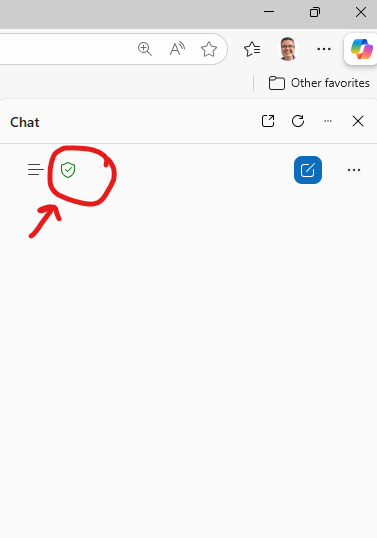
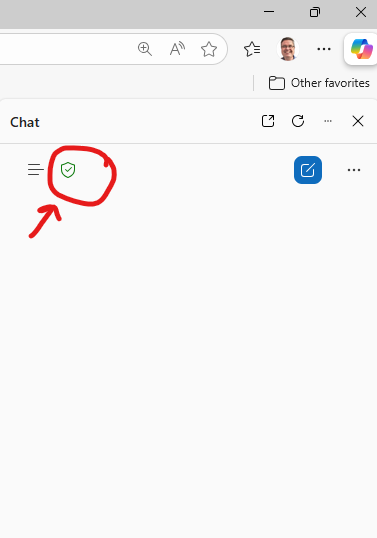
If you are signed in with your KTH account in your browser, you should see a small green shield icon at the top of the Copilot Chat window. This means your chat is secure. If you don’t see it, follow the instructions on this page to sign in to your browser.
It means that you are correctly signed in with your KTH account in the browser and that Copilot Chat is being used in
Company Data Protection mode, which includes the following:
Data is transmitted securely (encrypted) to Microsoft’s servers.
Input data is deleted after being temporarily stored (cached) during the session.
Data is not used to train the language model.
Plugins cannot be used (to prevent data leakage).
The service cannot be connected to an API.
It is very important that you ensure you are signed in with your KTH account.
Instructions on how to sign in is found on the main page for
Microsoft Copilot Chat
.
Microsoft Copilot is the name for several of Microsoft’s AI services. The web-based AI assistant (Microsoft Copilot Chat) should not be confused with M365 Copilot, which is integrated into Windows 11 and Office applications – and requires a separate licence. KTH does not currently offer this licence as part of its IT services. Before AI assistants become widely available at KTH, work is underway on information classification to ensure which data may be used.
You can generate images in Microsoft Copilot Chat based on text descriptions. Simply type what you want to see – for example, “a futuristic city at sunset” – and the model will create an image that matches your description.
Key features:
Creates original images based on text.
Can edit existing images (e.g., add objects, change backgrounds).
Supports various styles (realistic, cartoon, surreal, etc.).
Commonly used for design, marketing, idea visualisation, and creative work.
Yes, by uploading an existing image and describing in text what you want to edit. For example: “remove the lamp post from the image".
You are responsible for ensuring that the images you edit do not infringe on copyright, trademarks, personal privacy, or other protected rights.
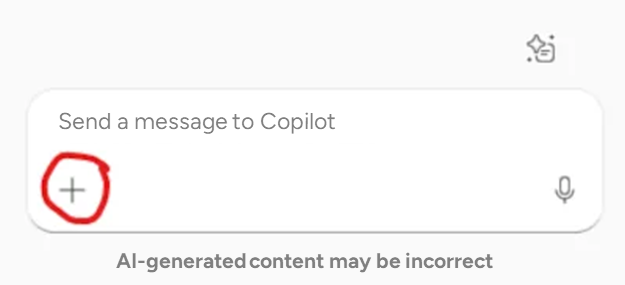
Click the plus icon at the bottom of the Copilot Chat window to add content.
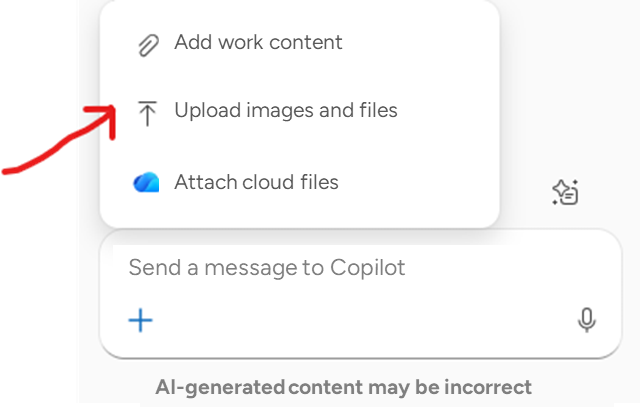
Choose how to add work material.
You can also copy an image or document and paste it directly into Copilot’s message field. Alternatively, you can drag and drop the file into the message field.
KTH has developed guidance with the aim of helping you use AI in a responsible and compliant manner, while adhering to ethical principles.
To comply with KTH’s guidelines and use Copilot Chat correctly and securely, you must be signed in to your browser with your KTH account.
If you are signed in with your KTH account in your browser
If you see the green shield icon in your Copilot Chat window, your chat is protected within the Enterprise protection security framework. This means:
Data is transmitted securely to Microsoft’s servers
Entered data is deleted after being temporarily cached during the session
Data is not used to train the language model
Plugins cannot be used (to prevent data leakage)
The service cannot be connected to an API
If you are not signed in with your KTH account in your browser
If you are not signed in with your KTH account in your browser, the following applies:
No organisational isolation
Your prompts and responses are treated as consumer data and are subject to OpenAI/Microsoft’s standard terms, not KTH’s agreed Microsoft 365 security policy
No organisational encryption or access control
KTH data is still encrypted, but not according to KTH’s regulations
May be used for model improvement
If you use a personal version (e.g., Copilot in Edge or Bing), your interactions may be used to improve the service, according to the provider’s terms
No guarantee of GDPR compliance within your organisational context
You are responsible for not sharing sensitive or business-critical information